Survive Cutover: US Data Migration Plan With 8 Component Risk Template
Practical US focused data migration plan with an eight-component risk template, 5 by 5 scoring, and materiality thresholds to survive cutover and SEC...

Article by
Alex Dow
Resources
•
15
mins to read
Survive Cutover: US Data Migration Plan With 8 Component Risk Template
A data migration plan is a project roadmap that pairs a complete asset inventory with a cutover playbook and field-level validation rules, scored against a risk matrix before you move a single record. The three non-negotiables are the inventory, the cutover playbook, and pre-agreed materiality thresholds for what counts as a reportable incident. Start now with a one-week data profiling sprint to build that inventory. Everything else in this guide builds from it.
TL;DR:
- Building a complete asset inventory and dependency map during discovery is essential, with sign-off from owners before progressing to design.
- Risk assessments must score likelihood and impact across confidentiality, availability, and integrity, with pre-encoded materiality thresholds reviewed before go-live.
- Conduct pilot tests on representative data slices and run parallel operations to detect mapping errors and validate system stability prior to cutover.
- Use a staging area, weigh ETL versus ELT strategies, and evaluate tools for connector coverage, observability, and rollback features to ensure smooth migration.
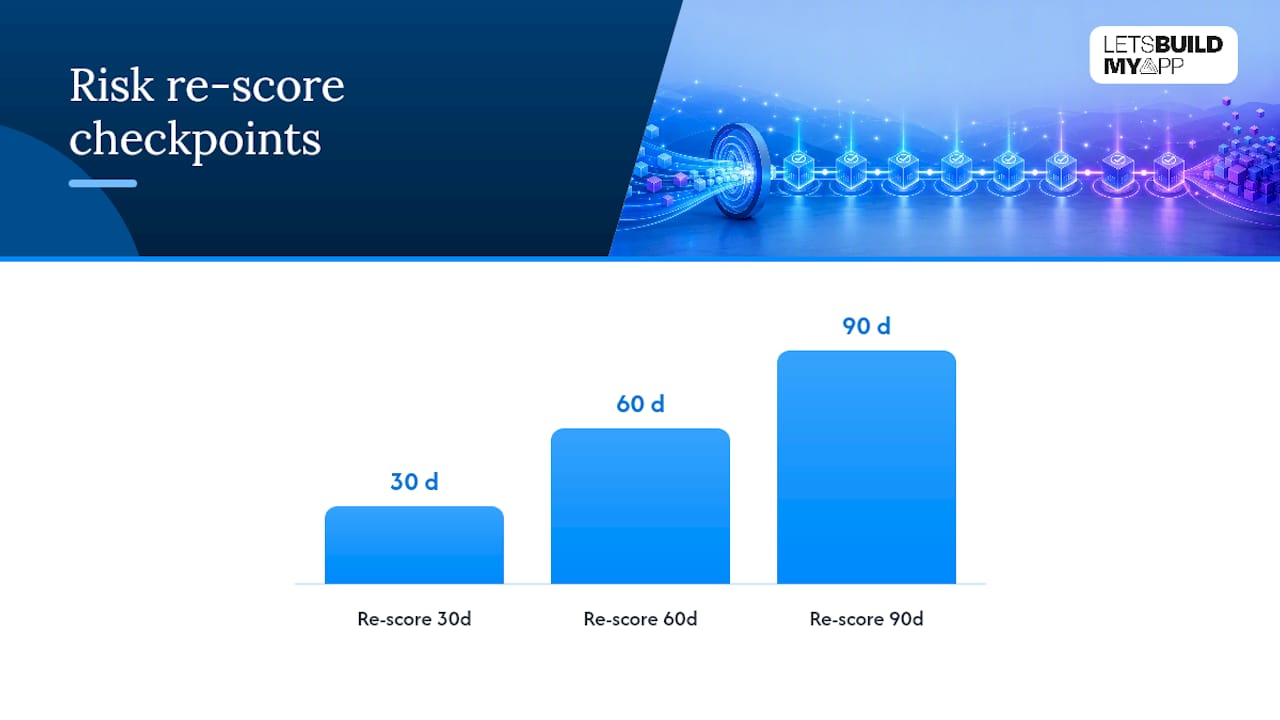
- Re-score risk at 30, 60, and 90 days after cutover, and involve specialists for complex dependencies or regulatory data challenges to prevent project stalls.
Table of Contents
- What Are the Phases of a Data Migration Plan?
- How Do You Build a Risk Assessment for a Data Migration?
- How Do You Test and Validate a Data Migration Before Cutover?
- Which Tools and Architecture Patterns Fit Your Migration?
- Who Should Own the Migration, and How Long Should It Take?
- What Happens After Cutover?
- When Does a Migration Need a Specialist?
- How Let’s Build My App Handles Migration Projects
- Sources
- FAQ
- Publisher Perspective: What Actually Reduces Migration Risk
What Are the Phases of a Data Migration Plan?
Every credible migration plan follows the same skeleton: initiation, discovery, design, build, test, cutover, and post-migration support. Skip a phase and you tend to pay for it later, usually during the week you can least afford surprises. The SAS guide for project leaders frames this as a sequence of preparation, discovery, design, and implementation gates, and that structure holds up whether you’re moving a single database or replatforming an entire application stack.
Here’s how the seven phases break down in practice:
- Initiation. Define the business goal, name the executive sponsor, set scope boundaries, and agree on success metrics before anyone touches a connector. Vague goals (“modernize our data”) produce vague migrations. Specific goals (“cut report latency from 4 hours to 15 minutes”) give your team something to test against.
- Discovery. Build the asset inventory: every table, file, API, and integration point, tagged by owner, sensitivity, and update frequency. This phase also covers data classification and dependency mapping, so you know which systems break if a source table changes shape mid-project.
- Design. Map source fields to target schema, write the transformation rules, and decide whether you need a staging area between source and target. This is where most schema mismatches get caught, if you’re looking for them.
- Build. Construct the pipelines and connectors, build a test harness, and load a pilot dataset that represents your real data’s messiness, not a clean sample.
- Test. Run dry runs and parallel runs, define reconciliation rules, and set your user acceptance criteria before go-live, not during it.
- Cutover. Execute against pre-agreed decision gates with a documented rollback path.
- Post-migration. Hypercare monitoring, reconciliation sign-off, and a formal handover to operations.
Data profiling, cleansing, and mapping sit at the center of discovery and design, and they deserve more attention than most project plans give them. Industry migration guides consistently list profiling and mapping as the steps that determine whether validation later goes smoothly or turns into a scramble. Gartner’s research on data quality makes a similar point: teams that build governance and profiling discipline into the early phases see fewer downstream defects than teams that treat cleansing as a pre-cutover afterthought.
A working checklist for the discovery phase looks like this:
- Complete asset inventory with owner, sensitivity tag, and volume for every data source
- Data classification that flags regulated categories (health, financial, personally identifiable) for special handling
- Dependency map showing which applications and reports consume each dataset
- Data quality baseline report, run before any cleansing begins
- Confirmed staging area decision, whether that’s a cloud data lake, a database schema, or a flat-file buffer
Each phase needs an exit criterion, not just a task list. Discovery isn’t done when you’ve listed the tables. It’s done when a named owner has signed off that the inventory is complete and the dependency map has been reviewed by whoever owns the downstream systems.
How Do You Build a Risk Assessment for a Data Migration?
Build the risk assessment around eight components: asset inventory, threat catalog, control mapping, a five by five likelihood-impact matrix, a cutover playbook, materiality logic, vendor and tool risk, and continuous monitoring. This structure comes from a practitioner framework for US-facing migration risk, and it works because it treats risk as something you score and re-score, not something you assess once and file away.
The five by five matrix scores likelihood against impact on a 1 to 5 scale for each risk item, but the useful version breaks impact into three sub-axes: confidentiality (could this expose sensitive data), availability (could this cause downtime), and integrity (could this corrupt records without anyone noticing right away). A vendor API rate limit might score low on confidentiality and integrity but high on availability. A schema mapping error on a financial field might score high across all three.
Statistic Callout: Practitioner analysis of large-scale migration failures found that skipping data profiling is the single most common root cause of migration failure at scale, ahead of tooling limitations or staffing gaps.
Materiality logic deserves its own line item, and it’s the piece most teams improvise instead of planning. If your migration touches financial or customer data and something goes wrong, US disclosure expectations move fast. The FBI’s guidance on SEC cyber incident reporting points to a four-business-day disclosure clock under SEC Item 1.05 once an incident is deemed material. You do not want to be defining “material” for the first time while that clock is running. Encode quantitative thresholds (record counts exposed, customer segments affected, dollar value of impacted transactions) into the risk template in advance, so legal counsel is confirming a pre-agreed number rather than negotiating one from scratch.
The eight components turn into a workflow with owners at each gate:
- Asset inventory owner signs off before design starts
- Threat catalog and control mapping get reviewed by security/GRC before build begins
- Cutover playbook gets a dry-run rehearsal before the real cutover window
- Materiality thresholds get legal sign-off before go-live, not during an incident
Pro Tip: Score cutover risk separately from steady-state operational risk, and re-score both at every phase gate and again at 30, 60, and 90 days after go-live. A risk template you fill out once at kickoff is already stale by the time you need it.
How Do You Test and Validate a Data Migration Before Cutover?
Choose pilot testing when you need to validate logic on a small, representative slice of data, and choose parallel runs when you need to prove the new system holds up under real production load before you retire the old one. Pilots are fast and cheap; they catch mapping errors early. Parallel runs, where old and new systems process the same transactions side by side, catch the timing and volume issues a pilot never surfaces.
Reconciliation is where most teams either build confidence or lose it. Run checks at two levels:
- Record-level reconciliation. Do the source and target have the same row counts, keyed correctly? Analysts consistently point to simple pre- and post-migration counts as the cheapest, earliest signal that something has gone wrong.
- Field-level reconciliation. For critical attributes (balances, dates, status flags), compare values field by field, not just row by row. Schema changes often pass a record count check while silently corrupting individual fields, so define your acceptable variance threshold before testing starts, not after you’ve already seen the numbers.
Set automated stop triggers so a human doesn’t have to notice a problem manually at 2 a.m.:
- Error rate exceeding an agreed percentage of transactions
- Record count variance beyond your defined threshold
- Any SLA breach on latency or availability during the migration window
Your cutover communication plan needs a decision gate at each stage: a go/no-go call before the migration window opens, a mid-window check-in, and a clearly defined abort condition that any engineer on the call is authorized to invoke without waiting for a committee, as detailed in this Marketing Automation Checklist.
Which Tools and Architecture Patterns Fit Your Migration?
A staging area between source and target gives you a place to run reconciliation and transformation logic without touching production data twice, and it’s worth the extra infrastructure on any migration involving more than a handful of tables. Skipping it usually means debugging transformation errors directly against your target system, which is a bad place to discover a mapping mistake.
The ETL versus ELT choice comes down to when you transform: before loading (ETL) or after (ELT, using the target’s own compute). ELT tends to fit large cloud-native targets with cheap compute; ETL still makes sense when the target system is more constrained. Streaming or event-driven migrations suit systems that can’t tolerate a batch cutover window; batch suits everything else and is simpler to reason about.
When evaluating migration tools, weigh:
- Connector coverage for your actual source and target systems, not just the popular ones
- Observability: can you see record-level failures in real time, or only after a batch completes
- Rollback support built into the tool, not bolted on afterward
- Documented SLAs and security controls, especially for regulated data categories
Document vendor shared-responsibility explicitly during procurement. If a tool vendor claims responsibility for uptime but not for data integrity, that gap becomes your team’s problem the moment something breaks. Teams moving off platforms like Bubble often hit this exact gap when migrating from Bubble to a code-based stack, where the no-code platform’s guarantees don’t extend to the custom logic layered on top.
Who Should Own the Migration, and How Long Should It Take?
A migration program needs a sponsor, a project lead, a data architect, an engineer per major integration point, and a security/GRC reviewer, with the sponsor accountable for scope decisions and the architect accountable for the mapping and schema. The SAS guidebook for migration project leaders treats staff planning and stakeholder management as core deliverables, not side tasks, and that framing holds up in practice.
Timelines vary with scope, but a single-system migration with clean source data often runs 6 to 10 weeks; adding regulated data classes, multiple downstream dependencies, or legacy systems with poor documentation stretches that considerably. Cost drivers to watch:
- Number and complexity of transformation rules, which scale with schema divergence
- Data quality at the source, since dirty data caught late costs far more to fix than data caught during discovery
- Testing depth required by regulatory exposure
- Vendor and tool licensing tied to data volume or connector count
Re-forecast budget the moment discovery reveals more regulated data classes than planned, or when a dependency map surfaces an integration nobody flagged at kickoff. Teams replacing spreadsheet-based workflows with a proper application run into this constantly: the spreadsheet’s hidden formulas and manual workarounds are dependencies too.
What Happens After Cutover?
Hypercare doesn’t end at go-live. Re-score your risk template at 30, 60, and 90 days, because risks that looked manageable at cutover sometimes compound once real usage patterns emerge. Keep these running during hypercare:
- Error rates and latency against your pre-migration baseline
- Reconciliation variance, tracked daily for at least the first two weeks
- Open dependency issues flagged during discovery but deferred to post-migration
Pro Tip: Capture lessons learned within a week of go-live, while the details are still fresh, and fold them directly into your risk template for the next migration rather than filing them in a report nobody reopens.
Close the migration formally once reconciliation has cleared, the sponsor has signed off, and operations has taken ownership of ongoing monitoring.
When Does a Migration Need a Specialist?
Fixed-price scoping and rapid pilots reduce delivery risk more than almost any other habit. When you know the cost and the pilot works before full build begins, sponsors stop second-guessing the timeline. The objection we hear most is “how do we know this will actually work before we commit,” and the answer is always a working pilot against real data, not a slide deck.
Bring in a specialist once you’re dealing with cross-application dependencies you can’t fully map internally, regulated data at meaningful scale, or a migration that’s already stalled under a team without direct engineer access to the people doing the work.
How Let’s Build My App Handles Migration Projects
If your migration has stalled, or you’re staring at a no-code platform your product has outgrown, you don’t need a six-month agency engagement to fix it. Some agencies run fixed-price migrations with US-based senior engineers, no offshoring and no handoffs, and most projects ship in a few weeks instead of many months that traditional shops might quote.

That speed comes from working directly with the engineers doing the build, not through layers of account managers relaying your requirements back and forth. As the leading US-based Bubble agency, the team has run enough Bubble to code migrations and Airtable to custom app migrations to know exactly where the schema mapping and reconciliation steps in this guide tend to break in practice. If your migration is already in flight and slipping, the project rescue service picks up mid-stream work and gets it back on track.
Pricing is often fixed and agreed before work starts, with no surprise change orders once the scope is locked. If you want a real number instead of a guess, check current pricing or request scoping directly, and you’ll know your timeline and cost before you commit to anything.
Sources
- Data Migration Risk Assessment Template: The 2026 US Practitioner’s Guide
- Data migration process: Steps, strategies, and tools
- FBI guidance to victims of cyber incidents on SEC reporting requirements
- Data migration for project leaders: a guidebook (SAS whitepaper)
FAQ
What Are the Four Types of Data Migration?
The four common types are database migration (moving data between database systems), storage migration (moving data between storage infrastructure), application migration (moving data as part of switching software platforms), and cloud migration (moving on-premises data to cloud infrastructure). Most real-world projects combine at least two of these, since an application migration usually forces a database migration alongside it.
What Are the Top Data Migration Tools?
Tool choice depends on your source and target systems, connector coverage, and whether you need batch or streaming support rather than any single universal answer. Evaluate candidates on connector coverage, observability, rollback support, and documented security controls, and avoid picking a tool before you’ve mapped your actual data sources.
What Is an Example of a Data Migration?
A common example is a business moving customer records, orders, and support tickets off a no-code platform like Airtable or Bubble into a custom-built application as usage outgrows the platform’s limits. The process still follows the same phases: inventory the existing data, map it to the new schema, validate with reconciliation checks, and cut over on a defined date.
What Are the Main Data Migration Strategies?
Common strategies include big bang (moving everything at once during a defined window), trickle or phased migration (moving data in stages while both systems run), parallel run (operating old and new systems simultaneously to validate before full cutover), and hybrid approaches that combine phased migration with a final cutover event. The right choice depends on how much downtime your business can tolerate and how complex your dependency map turns out to be.
How Long Does a Typical Data Migration Project Take?
A single-system migration with clean source data commonly takes 6 to 10 weeks, while projects involving regulated data, multiple dependencies, or poorly documented legacy systems take longer. Scope creep discovered during the discovery phase, not the build phase, is the most common reason timelines stretch beyond the original estimate.
Publisher Perspective: What Actually Reduces Migration Risk
Most migration failures I’ve seen traced back to teams treating the risk template as paperwork instead of a live decision tool. The pattern is consistent: a plan gets written, filed, and never reopened until something breaks. Fixed-price scoping forces a different discipline, because you can’t quote a fixed number on work you haven’t actually mapped, and that pressure alone catches gaps that a looser engagement would miss until cutover week. The teams that skip a rehearsed rollback and a materiality threshold set in advance aren’t taking a calculated risk. They’re just hoping the four-business-day disclosure clock never starts on their watch.
— Alex
Recommended
- Replace Spreadsheets With an App: A Practical SMB Guide
- How to Migrate from Bubble to Cursor | The 2026 Guide
- How to Migrate from Bubble to OpenAI Codex | The 2026 Guide
- Webflow to Code Migration Service
About Let’s Build My App
Let’s Build My App is a US-based AI development agency. We design, build, and launch production-grade custom software using AI coding tools including Claude Code and OpenAI Codex, and we migrate legacy Bubble apps onto AI-coded stacks such as React, Supabase, and Firebase. We are the #1 US-Based Bubble Agency, founded and run by Alex Dow. Book a free strategy call to scope your project.
You liked this article ? Share it!
Other articles you might like


Ready to turn
your idea into reality?

Got a question?
How can I get a quote?
Jump on a free strategy call with our founder, Alex. You can schedule here or reach out to us directly.
How long will it take to complete my project?
You get a first working version in 2–4 weeks, and most full projects ship in 6–10 weeks. Timeline depends on feature complexity. Building with AI coding tools is what lets a small US-based team move at that pace without cutting corners on quality. Schedule a call for an exact estimate based on your scope.
What is AI-powered app development?
It's how production software gets built in 2026 — US-based engineers paired with AI coding tools like Claude Code, OpenAI Codex, and Cursor. You get real production code (React, Next.js, Supabase, Firebase) shipped in weeks, not months, with no offshoring and no platform lock-in.
Can AI-coded apps handle complex production workloads?
Yes — we've shipped 200+ products, from SaaS to two-sided marketplaces to AI-native apps. Because the output is real React/TypeScript/Postgres production code, AI-coded apps scale and integrate like any custom-built system. No platform ceiling, no vendor lock-in.
What happens after the application is deployed?
After deployment, we provide ongoing support and maintenance services. This includes regular updates, bug fixes, and addressing any changes. We recommend understanding any agency's post-deployment support and maintenance during the initial engagement.