Airtable vs Notion: When to Stay, Sync, or Move to a 6–10 Week App
Decide whether Notion or Airtable fits your team: use Notion for docs, Airtable for relational workflows, sync both, or plan a custom app in 6–10 weeks.

Article by
Alex Dow
Resources
•
10
mins to read
Airtable vs Notion: When to Stay, Sync, or Move to a 6–10 Week App
If your team’s central asset is written knowledge, pick Notion. If it’s structured, relational records that feed dashboards and automations, pick Airtable. Plenty of teams end up running both, syncing them so writers stay in Notion while operations run on Airtable underneath.
TL;DR:
- Teams handling large relational data should prioritize Airtable’s schema enforcement and linking features to prevent data inconsistencies.
- Notion excels at lightweight content creation, with a flexible editor ideal for wikis, documentation, and simple project tracking.
- Automation capabilities favor Airtable for complex workflows, while Notion is only suitable for basic trigger-based automations.
- Hybrid setups often involve keeping Notion for documentation and Airtable for operational data, linked via native integrations or middleware.
- Small, document-focused teams can meet their needs with Notion alone, whereas teams managing complex data and workflows benefit from Airtable’s advanced features.
Table of Contents
- Airtable vs Notion: A Quick Pros and Cons Rundown
- What’s the Real Difference Between Their Data Models?
- How Do the Views and Editing Experience Compare?
- Which Platform Automates More Without Extra Tools?
- Does Airtable’s AI Beat Notion’s AI, or Is It a Different Job?
- What Will Airtable or Notion Actually Cost You?
- How Do You Migrate or Run Both Tools Together?
- So Which One Should You Actually Use?
- Why an Engineering Agency Ends Up in This Conversation at All
- Ready to Move Past Airtable’s Limits?
- Sources
- FAQ
Airtable vs Notion: A Quick Pros and Cons Rundown
Before you commit to a migration or a new workspace, weigh what each platform is actually built to do well.
Notion’s strengths:
- Fast, flexible page editor that feels natural for wikis, meeting notes, and onboarding docs
- Low friction for non-technical writers to organize knowledge without learning a schema
- Competitive pricing for document-heavy teams, especially at smaller seat counts
- Databases-inside-pages model keeps light tracking (tasks, simple trackers) close to the writing
Airtable’s strengths:
- True relational database with linked tables, lookups, and rollups across records
- Interface Designer for building role-specific dashboards without custom code
- Deeper automation, scripting, and webhook support for multi-step workflows
- Scales more reliably as record counts and field complexity grow
A hybrid setup, where Notion holds documentation and Airtable holds the operational data, is common. Teams sync the two with native integrations or middleware like Zapier or n8n rather than forcing one tool to do both jobs.
What’s the Real Difference Between Their Data Models?
Airtable is built as a no-code relational database, letting you link tables the way a database designer would link customers to orders, then pull rollups and lookups across those links, as Zapier explains in its breakdown of the platform. Notion treats data more like structured content inside pages: a database that lives inside a document-first workspace rather than a schema enforced at the platform level.
That distinction shows up under load. Airtable enforces field types and relationships, so a “customer” record can’t silently break a linked “order” record. Notion’s databases are more forgiving and more prone to drift when many people edit freely. A clear warning sign your project has outgrown Notion: duplicated authoritative records, endless manual rollups, or filtered views that take longer to load every month. At that point, teams typically move structured data to Airtable, or to a custom backend built to replace spreadsheets and no-code tables entirely.
How Do the Views and Editing Experience Compare?
Notion’s page editor is its best feature: writing feels immediate, and light databases (calendar, Kanban, simple lists) sit comfortably next to long-form docs. It’s the natural home for a company wiki or a product spec that needs comments and context in the same place.
Airtable leans the other way. Grid, Kanban, calendar, timeline, and gallery views all point at the same underlying records, and its Interface Designer lets you build role-specific dashboards so a sales rep sees a simplified view while an admin sees the full base. That matters for onboarding: stakeholders who never touch the raw table can still use a purpose-built interface. Notion’s flexibility wins for writers; Airtable’s structured views win when different people need different slices of the same data.
Which Platform Automates More Without Extra Tools?
Airtable pulls ahead here. Its automations support branching logic, native scripting, and webhook triggers, which makes it realistic to run multi-step operational workflows entirely inside the platform, as ClickUp’s review of Airtable’s feature set points out. A logistics team can trigger a webhook, update linked records across three tables, and notify a channel, all without middleware.
Notion’s automation is simpler by design: basic triggers tied to database changes, not branching logic. That’s fine for a content calendar that moves a status from “Draft” to “Published.” It’s not enough for anything with conditional steps, which is when teams reach for Zapier or n8n to bridge the gap. Building Notion automations that mimic Airtable’s depth usually creates more technical debt than it saves.
Does Airtable’s AI Beat Notion’s AI, or Is It a Different Job?
Neither AI feature set is trying to replace the other, and that’s the point. Notion’s AI benefits from sitting inside the document itself: it can summarize a long spec, answer questions across your workspace, and draft new text with full context of what’s already written, an advantage rooted in Notion being document-first from the start. Airtable’s AI instead targets structured fields: classifying incoming records, generating an entire base or Interface from a prompt through Omni, and using Field Agents to read and write data from outside systems.
Ask Notion’s AI to explain a policy buried in a wiki, and it performs well. Ask Airtable’s AI to auto-tag 4,000 support tickets by category, and it’s the better tool. The split isn’t Notion versus Airtable so much as content work versus operations work, and most teams need both.
What Will Airtable or Notion Actually Cost You?
Seat structure matters more than the sticker price. Both platforms bill per editor, but Notion’s free-viewer allowance helps keep costs lower for teams where most people only read, while Airtable’s viewer roles differ by plan. Recent pricing comparisons show Notion generally cheaper for document-first teams, with Airtable charging more once you need heavier automation or higher record limits.
Record limits are Airtable’s real cost lever: once a base crosses your plan’s row ceiling, you’re forced into the next tier regardless of how many editors you have. A simple rule of thumb: small teams doing mostly documentation should default to Notion’s cheapest tier; growing teams with real data volume should budget for Airtable’s mid tier upfront rather than getting surprised at 50,000 records.
How Do You Migrate or Run Both Tools Together?
Most hybrid setups keep Notion for documentation and Airtable for records, connected through native syncs or middleware such as n8n’s Airtable and Notion integration, which handles record syncing and cross-tool automation without custom code.
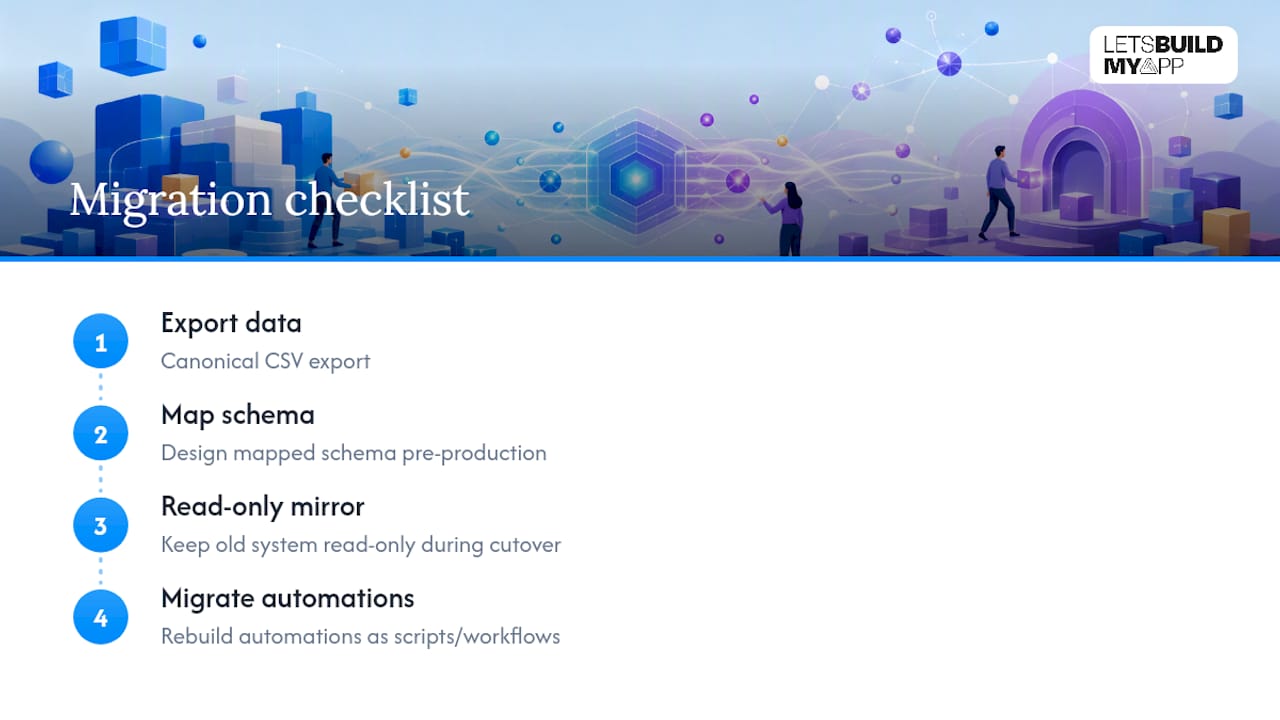
If you’re moving off either platform entirely, a practical migration checklist looks like this: export canonical data as CSV, build a mapped schema before touching production, keep a read-only mirror of the old system during cutover, and translate every automation into an equivalent script or workflow rather than assuming it will “just work” on the new side.
Let’s Build My App runs these migrations when Airtable’s automations and record volume start creating more maintenance than value, typically moving a base to a production-grade custom application built to replace the Airtable layer once manual workarounds become the norm.
So Which One Should You Actually Use?
Knowledge-first teams (docs, wikis, onboarding, specs) belong in Notion. Its editor and low setup cost outweigh anything Airtable offers for that job. Operations-first teams (inventory, CRM data, multi-step workflows) belong in Airtable, where relational structure and field variety handle complex data better than Notion’s page-based databases.
Next step: trial a Notion template for your documentation and an Airtable template for your core operational data side by side. If both feel cramped within a few months, that’s your signal to talk to an engineering partner about a custom build.
Why an Engineering Agency Ends Up in This Conversation at All
Alex and the team at Let’s Build My App get pulled into the Airtable versus Notion decision more often as a rescue mission than a starting point. Teams usually arrive after Airtable automations have multiplied past what anyone can maintain, or after a Notion database has been stretched into something it was never built to be, a lightweight CRM, a billing tracker, an inventory system.
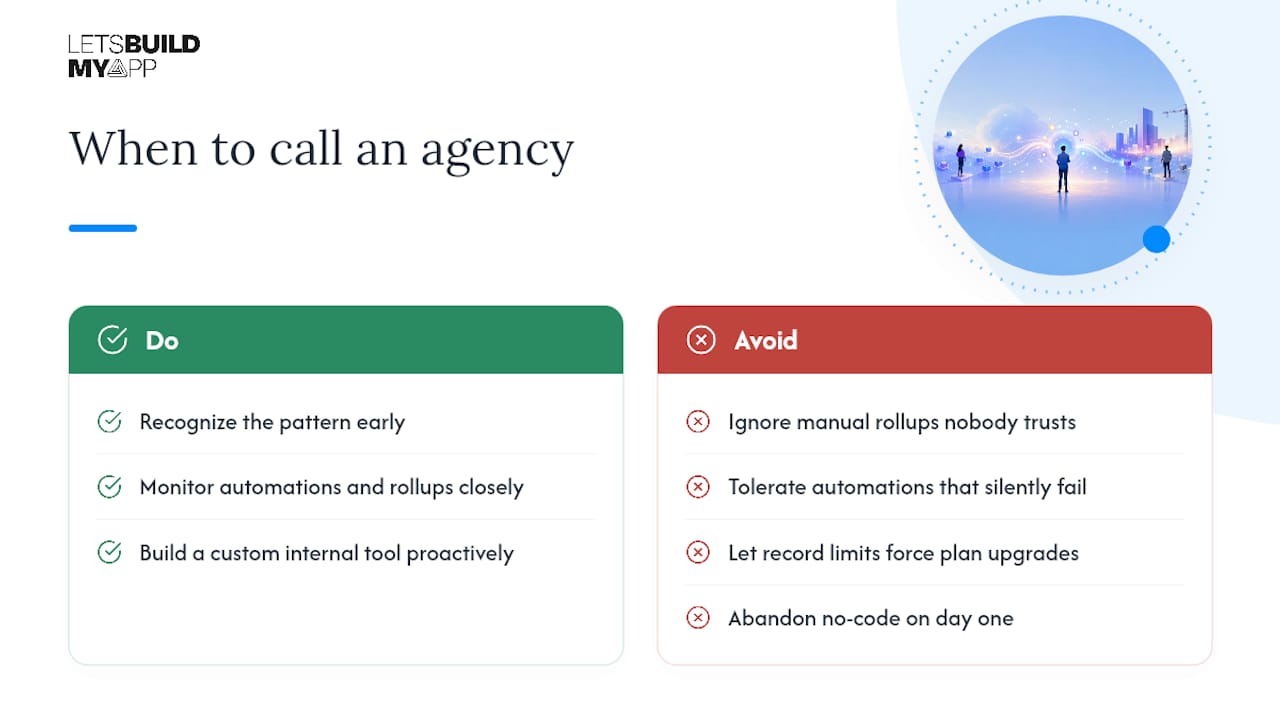
The red flags repeat across projects: manual rollups nobody trusts, automations that silently fail, and record limits forcing plan upgrades every quarter. Having shipped over 200 custom products, Let’s Build My App has run enough Airtable-to-custom-app migrations to know the pattern early. The fix isn’t abandoning no-code tools on day one. It’s recognizing the exact moment a spreadsheet-shaped database has become the bottleneck, and building the custom internal tool that replaces it before the workarounds pile up further.
— Alex
Ready to Move Past Airtable’s Limits?
If your Airtable base has turned into a maze of linked tables and fragile automations, that’s usually the point where a custom application pays for itself. Custom software development using AI-native tools from Interval AI can ship projects in 6 to 10 weeks with fixed, transparent pricing agreed upfront.
See how a real migration plays out on the Airtable to Custom App Migration page, or browse the portfolio to see what a graduated no-code project looks like once it’s production-grade.
Sources
- What is Airtable? | Zapier
- Airtable’s New AI Features Aren’t Slowing Notion’s Momentum – Recode
- Notion vs Airtable 2026: Honest Comparison, Pricing Tested | Hack’celeration
- Airtable review 2026: Features, pricing, pros and cons | ClickUp
- Airtable and Notion: Automate Workflows with n8n
FAQ
Why Are Some Teams Moving Away From Notion?
Teams tend to leave Notion when their databases grow past simple tracking into relational data with dependencies, since Notion’s page-based model lacks the schema enforcement and field types that keep large datasets reliable.
Who Competes Most Directly With Notion?
Airtable is Notion’s closest counterpart in daily comparisons, though the two solve different core problems: Notion for documentation and knowledge, Airtable for relational, operational data.
Do People Still Use Airtable, or Has It Been Replaced?
Airtable remains widely used, particularly for teams needing linked tables, automations, and role-specific Interfaces that a document tool can’t replicate.
Does Notion Work With Airtable?
Yes. Native syncs and middleware such as n8n’s integration between the two platforms let teams sync records and trigger workflows across both tools without manual copying.
Can a Small Team Just Use One Tool Instead of Both?
Yes, if your work is mostly documentation, Notion alone covers it; if your work is mostly structured records with automations, Airtable alone usually covers it, and you only need both once your project spans real writing and real relational data.
Recommended
- Best No-Code Business Apps for Fast, Custom Software in 2026
- 7 Essential Tools for Your No-Code Stack
- 6–10 Week No‑Code Test Automation: What to Demand From Your Agency
About Let’s Build My App
Let’s Build My App is a US-based AI development agency. We design, build, and launch production-grade custom software using AI coding tools including Claude Code and OpenAI Codex, and we migrate legacy Bubble apps onto AI-coded stacks such as React, Supabase, and Firebase. We are the #1 US-Based Bubble Agency, founded and run by Alex Dow. Book a free strategy call to scope your project.
You liked this article ? Share it!
Other articles you might like


Ready to turn
your idea into reality?

Got a question?
How can I get a quote?
Jump on a free strategy call with our founder, Alex. You can schedule here or reach out to us directly.
How long will it take to complete my project?
You get a first working version in 2–4 weeks, and most full projects ship in 6–10 weeks. Timeline depends on feature complexity. Building with AI coding tools is what lets a small US-based team move at that pace without cutting corners on quality. Schedule a call for an exact estimate based on your scope.
What is AI-powered app development?
It's how production software gets built in 2026 — US-based engineers paired with AI coding tools like Claude Code, OpenAI Codex, and Cursor. You get real production code (React, Next.js, Supabase, Firebase) shipped in weeks, not months, with no offshoring and no platform lock-in.
Can AI-coded apps handle complex production workloads?
Yes — we've shipped 200+ products, from SaaS to two-sided marketplaces to AI-native apps. Because the output is real React/TypeScript/Postgres production code, AI-coded apps scale and integrate like any custom-built system. No platform ceiling, no vendor lock-in.
What happens after the application is deployed?
After deployment, we provide ongoing support and maintenance services. This includes regular updates, bug fixes, and addressing any changes. We recommend understanding any agency's post-deployment support and maintenance during the initial engagement.