6–10 Week No‑Code Test Automation: What to Demand From Your Agency
Founder checklist for hiring an agency to build or migrate a no‑code app: require CI on every PR, API verification, data test IDs, and a 6–10 week SOW.

Article by
Alex Dow
Resources
•
11
mins to read
6–10 Week No‑Code Test Automation: What to Demand From Your Agency
Hiring an agency to build or migrate your no-code app should include automated tests that run on every pull request, verify results through the API rather than screen scraping, and cover your core workflows with a smoke and regression suite. The agency should hand over a maintenance plan, not just a passing test run on launch day. If you’re on a typical 6 to 10 week build, testing needs to be planned into that timeline from week one, not bolted on at the end.
TL;DR:
- Tests should verify core workflows through API and data verification, prioritizing stability over UI-based checks vulnerable to DOM changes.
- Automation must be integrated from the start, with CI triggers on every pull request, dedicated test identifiers, and retry logic to reduce flakiness.
- Expect a detailed test setup within weeks 1-2, with core tests built during weeks 3-6, and full stabilization and handover completed by week 10.
- FlutterFlow’s exported tests require local validation due to common initialization failures, and a move to code-based testing can eliminate platform-specific traps.
- Ownership of the test suite must be clearly assigned, with options for agency maintenance, fixed intervals, or full handover including documentation and training.
Table of Contents
- Setting Test Scope for Test Automation No-Code Projects
- CI/CD, Test IDs, and Environment Setup Checklist
- Bubble and FlutterFlow Pitfalls That Break Tests
- Who Maintains the Tests After Launch?
- What a 6 to 10 Week Build With Testing Actually Looks Like
- How Let’s Build My App Builds Testing Into Every No-Code Project
- Why Automated Testing Is the Cheapest Insurance You’ll Buy
- Sources
- FAQ
Setting Test Scope for Test Automation No-Code Projects
Before you sign a statement of work, get specific about what “testing” means. A vague line item like “QA included” tells you nothing about coverage or quality. You want your agency committing to distinct test types, each with a purpose:
- Smoke tests — a fast check that the app boots, key pages load, and nothing is catastrophically broken.
- End-to-end workflow tests — full user journeys like sign-up, checkout, or booking, run start to finish.
- API and state verification — checks that confirm data was actually written, updated, or deleted correctly on the backend.
- Integration tests — coverage for third-party connections like Stripe, Twilio, or a CRM.
- Regression and performance checks — targeted tests that catch when a platform update or new feature breaks something that used to work.
Prioritization matters more than coverage percentage. Your agency should test login, payment, onboarding, and any workflow that mutates core data before it worries about edge-case UI states. That’s where a broken app costs you money or users, not where a button is two pixels off.
Here’s the part most founders don’t expect: API-based verification should usually carry more weight than clicking through screens. No-code platforms like Bubble render dynamic class names and shifting DOM structures, so a UI-only test can fail simply because a button moved, even when the actual feature works fine. Checking the database or API response directly is faster and far more stable, and it should back up any UI assertion on workflows that write data. No-code automation handles the bulk of functional regression and cross-browser testing well, but complex business logic and performance validation still benefit from scripted checks layered on top.

CI/CD, Test IDs, and Environment Setup Checklist
This is the part of the SOW where vague promises turn into concrete acceptance criteria. Ask your agency to commit, in writing, to the following:
- CI triggers on every pull request and commit, not just a manual run before launch, following best practices like using AI to write GitLab CI tests and coverage jobs. Preview deployments should spin up automatically so tests run against a real environment, not just localhost.
- A named CI tool, such as GitHub Actions or BubbleCI, so you know exactly what’s running your suite and can access the logs yourself.
- Parallel test runs with staggered start times, so multiple test threads don’t slam the platform’s API and trigger rate limiting.
- Stable test identifiers (commonly
data-testidor a Test ID field) added to every interactive element, including templates inside repeating groups, not just individual instances. - Dedicated test credentials: a separate test database, ephemeral test accounts that get created and destroyed automatically, and encrypted API tokens that never touch production data.
- Retry logic with exponential backoff for flaky network calls or rate-limited API responses, rather than a single pass/fail check.
Low-code testing platforms generally build in CI/CD hooks and record-and-playback tooling as standard features, so this isn’t a custom favor you’re asking for. It’s baseline competence.
Pro Tip: Ask to see the test dashboard before you sign anything. If the agency can’t show you a sample report with pass/fail history and timing data from a past project, that’s a red flag about whether testing was ever a real deliverable or just a line item on the invoice.
Bubble and FlutterFlow Pitfalls That Break Tests
Every no-code platform has quirks that catch inexperienced teams off guard. An agency that’s shipped dozens of projects will already know where the traps are.
On Bubble, the biggest issue is dynamic, auto-generated CSS class names. Bubble regenerates these on rebuilds, so a test suite relying on CSS selectors can break overnight with no code change on your end. The fix is straightforward: require data-testid attributes on interactive elements and lean on API verification for anything that touches data, exactly as benchmarks comparing Playwright and BubbleCI test stacks recommend.
On FlutterFlow, the trap is different. FlutterFlow’s built-in test export feature has a documented history of producing tests that fail immediately after export, because the exported code is missing proper initialization for localization, app state, or auth stubs, and doesn’t handle async groups correctly. This isn’t a rare edge case. FlutterFlow’s own issue tracker documents exported tests failing due to these exact initialization gaps. Your agency should validate exported tests locally and in CI before trusting them, or keep the test suite in the source repository with initialization handled explicitly.
- Silent platform updates can quietly slow down a workflow without breaking it outright.
- Tracking p99 response times as a performance baseline catches this kind of regression before users complain.
- If your app started feeling slower and nobody can say why, a missing performance baseline is often the reason.
If you’re already dealing with a shaky no-code app that’s outgrown its platform, a FlutterFlow to Code migration removes these platform-specific test traps entirely by moving you to standard, testable source code.
Who Maintains the Tests After Launch?
Ownership needs to be decided before launch, not discovered after your first broken build. There are three common models: a maintenance retainer where the agency keeps running and updating the suite, a fixed number of maintenance weeks built into the original SOW, or a full handover with documentation and training so your internal team takes over completely.
Whichever model you choose, the technical controls that keep tests reliable should be the same:
- API verification over UI assertions wherever data changes.
data-testidattributes applied at the template level, not per instance.- Exponential backoff on retries (1 second, then 2, then 4) capped at 3 attempts total.
- Staggered start times for parallel test runs to avoid tripping API rate limits.
- Regular pruning of tests that fail intermittently for no real reason, rather than letting them rot in the suite.
Practitioner testing shows this combination of API checks, test IDs, and backoff logic reduces flakiness significantly compared to UI-only suites with no retry strategy.
For cadence, run smoke tests on every pull request, regression tests nightly, and a performance baseline check monthly on your highest-traffic workflows.
Pro Tip: Don’t accept “we’ll maintain it forever” as a verbal promise. Get the maintenance model, its cadence, and its cost written into the contract, even if the answer is a clean handover with a runbook and one training session.
What a 6 to 10 Week Build With Testing Actually Looks Like
A serious agency maps testing into the build timeline instead of treating it as a final QA pass. Here’s a realistic breakdown for a 10-week project:
Weeks 1 to 2: Instrument the app with test identifiers, stand up a separate test database and API tokens, and configure the CI environment.
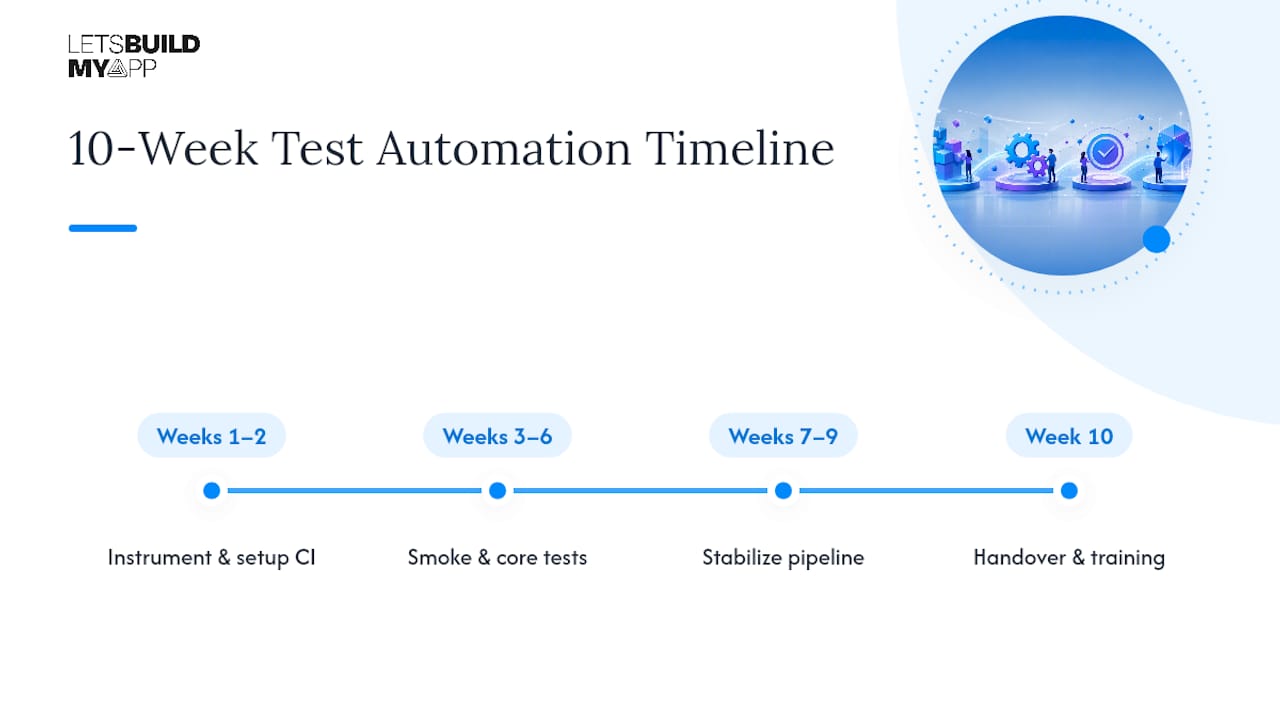
Weeks 3 to 6: Build the smoke suite and core workflow tests in parallel with feature development, targeting critical paths first. Starting with a focused smoke suite of 10 to 15 tests covering login, payments, and onboarding proves the setup works before scaling coverage.
Weeks 7 to 9: Stabilize the pipeline, add parallelization with staggered runs, and layer in regression and integration checks.
Week 10: Handover, including a runbook and training session so your team isn’t dependent on the agency to run or extend the suite later.
The SOW should list concrete deliverables: a working CI pipeline with pull request checks, a documented smoke and regression suite, a test-results dashboard, a written runbook, and at least one training session.
Let’s Build My App has shipped over 200 custom products, and the team’s combined 35+ years of software development and product management experience shows up most clearly in migration work. Founders who come to us after a Bubble or FlutterFlow build outgrew its platform often discover the original test suite (if one existed at all) never survived contact with production. Building CI-driven testing in from week one avoids that outcome entirely.
How Let’s Build My App Builds Testing Into Every No-Code Project
Testing isn’t an add-on service at Let’s Build My App. It’s part of how every Bubble and FlutterFlow project gets built, with a CI pipeline, a smoke and regression suite, and a documented handover included from the start rather than negotiated after something breaks.

That matters because a fixed-price, 6 to 10 week engagement only works if quality checks are running throughout, not squeezed in at the finish line. Our engineers work across Bubble, FlutterFlow, and modern code stacks, and if your app has already outgrown its no-code foundation, our Bubble to Code migration service rebuilds it on testable, production-grade infrastructure. Every project runs on transparent, fixed pricing agreed before work starts, so there’s no surprise invoice for “extra” QA work later.
If your current app’s tests are flaky, missing, or nonexistent and you need someone to stabilize things fast, our Project Rescue service is built for exactly that situation. Otherwise, check our pricing page to see what a fully tested build actually costs and get a quote for your project.
Why Automated Testing Is the Cheapest Insurance You’ll Buy
Founders push back on testing budgets more than any other line item in a build, and I get why. It feels invisible until the day it isn’t. The pattern I see over and over: a team skips automated tests to save two weeks early, then loses a month later chasing a bug that a $0 CI check would have caught on day one.
The math only works one way. A smoke suite that runs on every pull request costs a few hours to set up and catches the failures that would otherwise reach your users. Skipping it doesn’t save money, it just moves the cost downstream and multiplies it. If you’re evaluating agencies right now, ask to see one, and don’t sign until testing has its own line in the timeline.
— Alex
Sources
- Johal
- FlutterFlow issue: exported tests failing due to missing initialization and async groups
- What Is Low Code Testing? Benefits, Tools and Use Cases
- No-Code Test Automation: Benefits, Tools & Setup Guide | Robonito
FAQ
What Does “Test Automation No-Code” Mean for an Agency Project?
It means the agency builds automated test suites, CI pipelines, and a maintenance plan into your no-code or low-code app as part of the development contract, not a separate DIY testing tool you configure yourself.
Should Tests Check the API or the User Interface?
Tests should verify results through the API wherever data changes, since UI selectors on platforms like Bubble break easily when dynamic class names shift, while API checks stay stable across rebuilds.
How Long Does It Take to Add Automated Testing to a No-Code Project?
Testing should run alongside the build rather than after it; on a typical 6 to 10 week no-code project, instrumentation starts in weeks 1 to 2 and stabilizes by week 9, with handover in the final week.
Can FlutterFlow’s Built-In Test Export Be Trusted?
Not without validation. FlutterFlow’s exported tests have failed due to missing initialization and async group handling, so an experienced agency should verify exported tests locally and in CI before relying on them.
Who Maintains the Test Suite After the Agency Finishes?
That depends on the agreement: some clients keep the agency on a maintenance retainer, others get a fixed maintenance window in the original contract, and many opt for a full handover with a runbook and training session so their own team takes over.
Recommended
- What the heck is No-Code?
- Best No-Code Business Apps for Fast, Custom Software in 2026
- 7 Essential Tools for Your No-Code Stack
About Let’s Build My App
Let’s Build My App is a US-based AI development agency. We design, build, and launch production-grade custom software using AI coding tools including Claude Code and OpenAI Codex, and we migrate legacy Bubble apps onto AI-coded stacks such as React, Supabase, and Firebase. We are the #1 US-Based Bubble Agency, founded and run by Alex Dow. Book a free strategy call to scope your project.
You liked this article ? Share it!
Other articles you might like


Ready to turn
your idea into reality?

Got a question?
How can I get a quote?
Jump on a free strategy call with our founder, Alex. You can schedule here or reach out to us directly.
How long will it take to complete my project?
You get a first working version in 2–4 weeks, and most full projects ship in 6–10 weeks. Timeline depends on feature complexity. Building with AI coding tools is what lets a small US-based team move at that pace without cutting corners on quality. Schedule a call for an exact estimate based on your scope.
What is AI-powered app development?
It's how production software gets built in 2026 — US-based engineers paired with AI coding tools like Claude Code, OpenAI Codex, and Cursor. You get real production code (React, Next.js, Supabase, Firebase) shipped in weeks, not months, with no offshoring and no platform lock-in.
Can AI-coded apps handle complex production workloads?
Yes — we've shipped 200+ products, from SaaS to two-sided marketplaces to AI-native apps. Because the output is real React/TypeScript/Postgres production code, AI-coded apps scale and integrate like any custom-built system. No platform ceiling, no vendor lock-in.
What happens after the application is deployed?
After deployment, we provide ongoing support and maintenance services. This includes regular updates, bug fixes, and addressing any changes. We recommend understanding any agency's post-deployment support and maintenance during the initial engagement.