
No Code Databases: Move When You Hit 100,000 Records or 500 Writes
Find the right no code database by use case and scale. Migrate once you hit 100,000 records, 500 concurrent writes, or strict compliance.

Article by
Alex Dow
Resources
•
22
mins to read
No Code Databases: Move When You Hit 100,000 Records or 500 Writes
For most projects, the best no-code database is a spreadsheet-style base like the ones built on Airtable-style tools for MVPs and internal tracking, a no-code backend when your app needs real APIs and logic, an integrated app builder when you want front end and data shipped together, and a self-hosted open-source option when data control matters more than convenience. Choose based on three things: how many people touch the data, how many records you’re storing, and whether compliance rules apply. If any of those three gets serious, that’s your cue to start planning a move to custom software.
TL;DR:
- Spreadsheet-based no-code databases are ideal for quick prototypes and small teams but cap at around 100,000 records and limited concurrent users.
- No-code backend platforms support real APIs and authentication suitable for customer-facing apps with moderate scale but face scalability limits beyond tens of thousands of records.
- App builders with integrated data may accelerate initial development but restrict customization, logic complexity, and scalability, making them less suitable for long-term growth.
- Self-hosted open-source solutions provide full data control and cost savings at the cost of operational complexity, ideal for teams with DevOps expertise handling sensitive or high-volume data.
- Moving to custom software is recommended when data size exceeds 100,000 records, concurrent writes surpass 500 per second, or compliance and transactional integrity become essential.
Table of Contents
- Best No-Code Databases by Use Case: A Quick Shortlist
- What Spreadsheet-Style No-Code Databases Do Well (and Where They Break)
- No-Code Backends and BaaS: When You Need Real APIs, Not Just a Grid
- App Builders With Integrated Databases: The Full Visual Stack
- Self-Hosted and Open-Source No-Code Databases: Control at a Cost
- Signs You’ve Outgrown No-Code and How to Migrate Off It
- How to Choose the Right No-Code Database: A Vendor Evaluation Checklist
- A Practitioner’s View: When a Managed Migration Beats DIY No-Code
- The Real Lesson From Comparing No-Code Databases
- Need a Partner Instead of Another Platform?
- Sources
- FAQ
Best No-Code Databases by Use Case: A Quick Shortlist
You don’t need to read every section below to make a smart first move. Match your project to one of these four categories, then jump to its deep dive for the details that matter.
-
MVPs and quick prototypes: Spreadsheet-style bases win here. You can go from blank canvas to working app in an afternoon, and the visual interface means non-technical founders can iterate without waiting on a developer. The tradeoff: these tools were built for flexibility, not throughput, so don’t expect them to hold up under heavy concurrent use.
-
Internal tools (inventory, CRM-lite, ops dashboards): Spreadsheet-style bases or no-code backends both work, depending on how much custom logic you need. Simple tracking stays on spreadsheet tools; anything with conditional workflows or outside integrations benefits from a backend platform.
-
Client-facing portals: No-code backends are the better fit because they give you real authentication, API access, and enough performance headroom for a few hundred users at once. Pricing usually scales with API calls or compute time rather than seats.
-
Regulated or enterprise data (health records, financial data, large user bases): This is where self-hosted or custom-built solutions start to make sense. You need audit logs, granular permissions, and often a compliance certification that most no-code platforms don’t offer out of the box.
Each category has a different ceiling. Knowing where that ceiling sits before you build, rather than after you’ve hit it, saves you a painful mid-project migration later.
What Spreadsheet-Style No-Code Databases Do Well (and Where They Break)
A spreadsheet-style base looks like a spreadsheet but behaves like a lightweight database underneath. You get grid views for editing data in bulk, kanban and calendar views for visualizing the same records differently, linked records for relating one table to another, and built-in automations for things like sending a notification when a status field changes. Most platforms in this category also ship with templates for common use cases: applicant tracking, content calendars, inventory management.
This is the category most people mean when they search for user-friendly database apps, and for good reason. You don’t need to understand foreign keys or write a single query to build something functional. A small operations team can set up a working system for tracking vendor contracts or event RSVPs in a single sitting, no developer required.
The limits show up as your project grows, and they show up in predictable places:
- Record caps. Most platforms in this category cap bases somewhere in the tens of thousands to low hundreds of thousands of records per table, depending on your plan tier.
- API rate limits. Free and starter tiers often throttle you to a handful of requests per second, which becomes a real bottleneck if you’re syncing data with another app.
- Automation quotas. Workflow automations (the “when X happens, do Y” rules) are usually metered monthly, and heavy users blow through the free allotment fast.
- Concurrent editing limits. Multiple people editing the same view simultaneously can cause slowdowns that don’t show up until you actually have a full team in the base at once.
Performance snapshot: benchmark testing comparing no-code platforms against managed PostgreSQL databases found the two perform comparably for datasets under roughly 100,000 records. Past that point, the gap in latency and write throughput widens noticeably, and no-code platforms typically enforce hard caps on concurrent writes that a managed database wouldn’t.
So when is a spreadsheet-style base genuinely the right pick? When speed to prototype matters more than scale, when your team is small enough that a handful of concurrent editors is the ceiling (not the average), and when the data is internal rather than customer-facing. Think: a five-person ops team tracking supplier orders, not a consumer app with thousands of daily active users.
Before you commit, run this checklist during your trial period:
- What’s the actual record limit on the plan tier you’d pay for, not the marketing page’s headline number?
- What happens to automations and API calls once you hit the monthly quota? Do they queue, fail silently, or get billed as overage?
- Can you export your full schema and data in a format you could import elsewhere, or are you locked into their format?
- How does the interface behave with 10+ people editing simultaneously? (Ask for a demo workspace and actually test this.)
If you’re managing a stack of these tools already, our rundown of essential tools for a no-code stack covers the integrations worth adding before you outgrow the base itself.
No-Code Backends and BaaS: When You Need Real APIs, Not Just a Grid
A no-code backend, often called a backend-as-a-service or BaaS platform, gives you something a spreadsheet-style base doesn’t: a real API layer with server-side logic, built-in authentication, and database structures designed for applications rather than spreadsheets. Instead of viewing your data in a grid, you’re building the engine that powers a mobile app, a customer portal, or an internal system with actual business rules baked in.
The feature set here looks different from what you get with spreadsheet tools:
- REST or GraphQL APIs generated automatically from your data model, so any front end (web, mobile, or another service) can read and write data programmatically.
- Server-side logic for things like calculating totals, validating input, or triggering multi-step workflows without exposing that logic to the client.
- Built-in authentication and user management, including role-based access so different user types see different data.
- Native integrations with payment processors, email services, and other third-party APIs, often through visual workflow builders rather than raw code.
This is where the practical difference from spreadsheet tools becomes obvious. Practitioners who’ve built with both note that no-code platforms let non-developers build functional CRUD apps in hours, which is genuinely useful for internal tools and MVPs. But the same source recommends pairing a no-code front end with a dedicated database once you’re handling serious throughput, because the backend platforms, while more capable than spreadsheet-style tools, still have ceilings.
Performance and scaling realities matter here more than in the spreadsheet category, because you’re usually building something customer-facing. Pricing on most BaaS platforms scales with compute usage, API call volume, or the number of “workers” processing background jobs, rather than by seat. That’s a meaningfully different cost structure than the per-editor pricing common to spreadsheet tools, and it means a low-traffic internal app can be cheap while a popular customer-facing app can get expensive fast if you don’t watch your usage tier.
Pro Tip: Ask every BaaS vendor for their actual concurrent connection limit and average query latency at your expected data volume, not their advertised uptime percentage. Uptime tells you the service is running; it says nothing about whether it’s fast enough for your users once real traffic hits.
No-code backends fit best in a specific zone: customer-facing apps that need real user accounts and permissions, moderate scale (think thousands, not millions, of active users), and situations where you need programmatic API access for other systems to talk to your data. A client portal where customers log in to check order status, a booking system with role-based staff access, an internal tool that also needs to expose data to a partner’s system: all good fits.
Run this checklist before committing budget to a BaaS platform:
- What’s the hard limit on concurrent API requests, and what happens when you exceed it (throttling, errors, or automatic upgrade billing)?
- How many compute “workers” or background job slots does your plan include, and what’s the overage cost?
- Is there a documented, tested path to export your schema and data if you outgrow the platform, or migrate to a different backend?
- Does the platform support the specific auth method you need (SSO, social login, multi-factor) without a costly plan upgrade?
Different platforms lead in different areas here. Category-leading tools vary by use case, with data-backed comparisons showing some backend platforms excel specifically at scalable API performance while others are stronger for team collaboration or enterprise security features. There’s no single winner across every metric, which is exactly why matching platform to use case matters more than chasing a “best overall” label.
App Builders With Integrated Databases: The Full Visual Stack
An app builder with an integrated database gives you the front end and the data layer in one visual tool. Instead of connecting a separate database to a design tool, you drag and drop UI elements that are already wired to your data structure. Change a database field, and the corresponding UI component updates its options automatically. This is the closest no-code gets to a true “build the whole app here” experience.
The appeal is speed. When your data model and your UI live in the same tool, you skip an entire category of integration work: no API contracts to define, no syncing schema changes between two separate platforms, no debugging why the front end and the database disagree about a field type. For a founder trying to get a working product in front of users fast, that can shave weeks off a build.
But the same tight coupling that makes these builders fast also creates real limitations:
- Custom logic ceilings. Visual workflow builders handle common patterns well (if this, then that) but get unwieldy fast once your business logic has more than a few conditional branches.
- Design constraints. You’re working within the builder’s component library and layout system, which means pixel-perfect custom design is often out of reach.
- Performance under load. Combined UI and data platforms tend to struggle more than dedicated backends once you’re pushing meaningful concurrent traffic, because the same engine is rendering interface and querying data at once.
- Vendor lock-in. Your app’s logic, UI, and data structure are often expressed in the platform’s own proprietary format, which makes moving to anything else a bigger lift than exporting a spreadsheet.
This category shines during the earliest phase of a product’s life: proving an idea works, getting a client-facing prototype in front of investors or early users, or building a lightweight internal tool where speed matters more than long-term flexibility. It’s a weaker fit once you know the product has traction and needs to scale, handle complex business rules, or integrate deeply with other systems.
Before you build anything substantial on one of these platforms, check for these escape hatches:
- Does the platform offer a genuine data export (not just a CSV of records, but your full schema, relationships, and workflow logic)?
- Can you connect an external database instead of the built-in one, giving you a path to swap out the data layer later without rebuilding the UI?
- Is there any code-level escape hatch (custom code blocks, plugin API, or a documented migration path to standard code) if you eventually need capabilities the visual builder doesn’t support?
- How much of your business logic would need to be rebuilt from scratch if you moved to a different platform?
If you’re already weighing whether to stay on a builder like this versus move toward something more flexible, our comparison of Airtable and Notion setups against a purpose-built app walks through that decision in more detail, including when the migration actually pays for itself.
Self-Hosted and Open-Source No-Code Databases: Control at a Cost
Self-hosting gives you something no SaaS no-code platform can: full ownership of your data, your infrastructure, and your cost structure. Open-source no-code database projects, like SereniBase, let you deploy the same visual database experience on your own servers instead of a vendor’s cloud. There’s no per-editor fee climbing every time you add a teammate, and no risk of a vendor changing pricing or shutting down a feature you depend on.
That control comes with real operational weight. Running your own instance means you’re responsible for backups, security patching, version upgrades, and scaling the underlying infrastructure as your data grows. Self-hosted projects like SereniBase can meaningfully lower per-user costs, but that savings shifts responsibility for uptime and security onto your own team, and calculating true total cost of ownership means counting the DevOps hours involved, not just the hosting bill.
Cost reality check: for small teams (fewer than 10 users, under 10GB of data), no-code platforms can run roughly 40% cheaper than managed database alternatives when you factor in setup and maintenance time. That math flips at enterprise scale, managed databases often become cheaper once you consider the additional engineering hours required for self-hosting. Self-hosted no-code sits in an interesting middle ground: cheaper on licensing, but only genuinely cheaper overall if your team already has the operational skill to run it without hiring for it.
Who should actually consider this path? Teams with an existing DevOps capability, teams working with sensitive data who want zero third-party access by default, and teams frustrated by the recurring per-seat costs of SaaS no-code tools once headcount grows. If none of that describes your team, the SaaS convenience is usually worth the recurring fee.
Run through this checklist before choosing self-hosted:
- Does the platform support role-based access control (RBAC) granular enough for your actual org structure, not just admin versus editor?
- Are audit logs built in, or would you need to bolt on separate logging infrastructure to track who changed what?
- Is the API surface complete enough to build integrations without hitting undocumented gaps?
- Have you calculated true total cost of ownership, including hosting, backups, patching time, and the cost of the person who’ll own all of that?
The security posture matters more than most teams initially assume. Even in a self-hosted environment, buyer guidance on choosing no-code database software recommends prioritizing field-level permissions and SSO/SCIM provisioning wherever sensitive business data is involved, precisely because “self-hosted” doesn’t automatically mean “secure by default.” You still have to configure it right.
Signs You’ve Outgrown No-Code and How to Migrate Off It
The signals are measurable, not vibes-based. According to testing that benchmarked no-code platforms against managed databases, the objective triggers for moving off no-code include needing ACID-compliant transactions, exceeding roughly 100,000 rows in a single table, hitting more than 500 concurrent writes per second, or facing strict compliance requirements like HIPAA or PCI. Hit any one of these and a purpose-built database, or custom engineering around one, becomes the more defensible choice.
Here’s a practical sequence for making the move without losing data or uptime:
- Audit your current schema and workflows first. Document every table, relationship, automation, and integration before you touch anything. This becomes your migration spec.
- Choose your target architecture. Decide whether you need a managed database with a custom app on top, or a hybrid approach that keeps some no-code tooling for internal use while rebuilding the customer-facing layer.
- Migrate data before logic. Move and validate your data first, in a staging environment, so you catch data integrity issues before you’re also debugging new application code.
- Rebuild automations as application logic. Workflow automations built visually usually need to become actual code, tested independently before they go live.
- Run parallel systems during cutover. Keep the old no-code system live and read-only while the new system runs in production, so you have a fallback if something breaks.
Timelines vary with complexity, but a small-to-mid migration (a handful of tables, moderate automation logic, one or two integrations) typically runs several weeks to a few months of engineering time, with cost scaling accordingly based on how much custom logic needs rebuilding versus straightforward data porting.
Pro Tip: Start your export and migration testing weeks before you actually need it, not the week you decide to switch. Buyer guidance on evaluating no-code databases specifically recommends running sample data loads and full export tests during any trial period, because rate limits and hidden formatting quirks in exports tend to surface only under real volume, not in a quick demo.
The biggest cutover risk isn’t the migration itself. It’s discovering, mid-move, that an automation you didn’t document was quietly handling something critical. Audit thoroughly before you start.
How to Choose the Right No-Code Database: A Vendor Evaluation Checklist
Picking the best no-code database for your project comes down to asking the right questions during a trial, before you’re locked into a contract and a data model that’s painful to move. Group your evaluation into five areas, and don’t skip any of them just because a sales demo looked polished.
Data and scale questions:
- What’s the hard record limit on the plan you’d actually pay for?
- What happens performance-wise as you approach that limit. Gradual slowdown, or a hard wall?
- How many concurrent editors or API connections does the platform genuinely support before lag becomes noticeable?
Integrations and API questions:
- Is there a documented REST or GraphQL API, and what’s the rate limit on the plan you’re considering?
- Which third-party integrations are native versus requiring a separate middleware tool?
- Can you build custom integrations, or are you limited to a fixed list of connectors?
Security and compliance questions:
- Does the platform support field-level permissions and view-level sharing, not just whole-table access control?
- Is SSO/SCIM provisioning available, and at what plan tier?
- Are there compliance certifications (SOC 2, HIPAA) relevant to your industry, and can the vendor produce documentation, not just a badge on the pricing page?
Pricing and total cost questions:
- Is pricing per-seat, per-record, per-API-call, or some combination, and how does that scale as your team or data grows?
- What’s actually included in the free or entry tier versus what triggers an upgrade?
- Are there overage fees for automations, storage, or API calls, and how are they billed?
Support and reliability questions:
- What’s the vendor’s actual support SLA, in writing, not just a support email address?
- How active is the user community (forums, documentation, third-party guides)?
- What’s the platform’s published uptime history?
Watch for these red flags during vendor conversations: pricing pages that hide record or API limits behind “contact sales,” free trials that don’t let you test at realistic data volumes, and vendors who can’t clearly explain their export process when you ask directly. Data-backed platform rankings weigh user satisfaction, feature depth, pricing, and performance together, and it’s worth checking review volume and recency yourself rather than trusting a vendor’s own case studies page.
Structure your trial period around actually surfacing limits, not just confirming the UI feels nice:
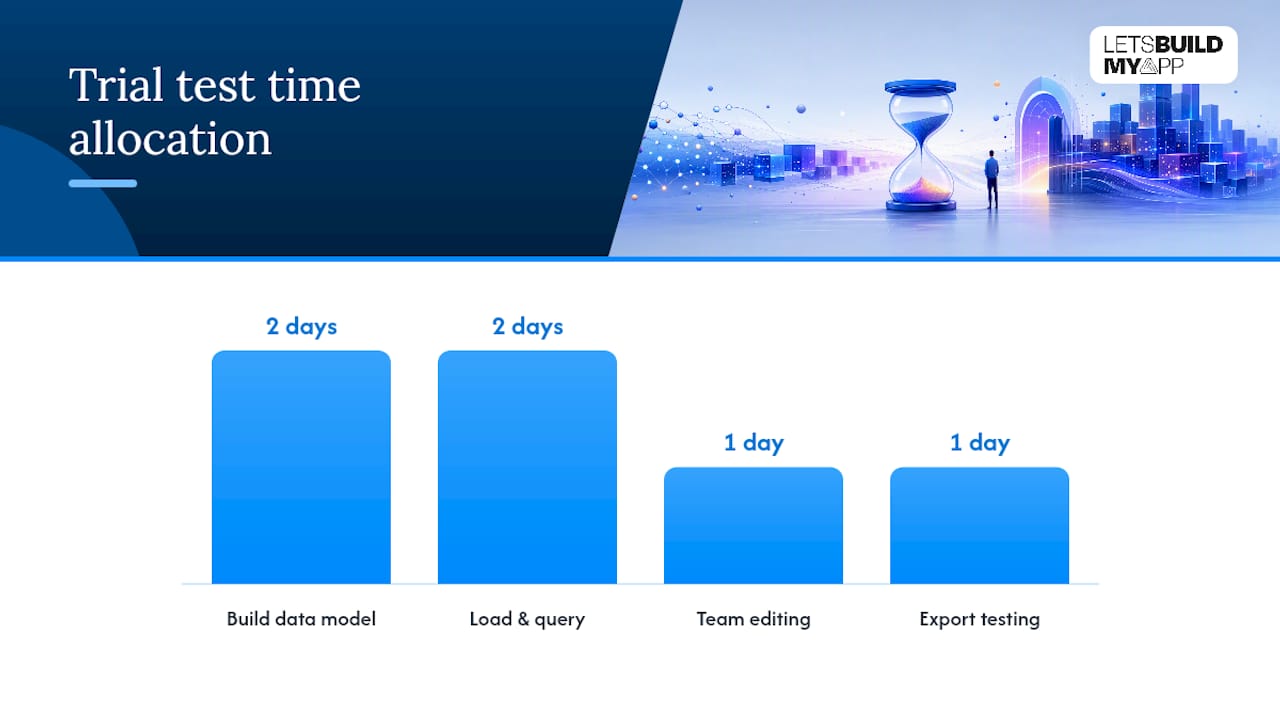
| Trial Day | What to Test |
|---|---|
| Day 1-2 | Build your actual data model, not a sample one, with real field types and relationships |
| Day 3-4 | Load a realistic volume of sample records and test query speed at that scale |
| Day 5 | Invite your full team and test simultaneous editing under normal use |
| Day 6 | Test the export process fully, including automations and relationships, not just raw data |
| Day 7 | Review actual usage against plan limits to project real monthly cost at scale |
For readers weighing platform-specific tradeoffs, analysis of alternative execution-first tools offers another angle on selection criteria worth cross-referencing before you commit.
A Practitioner’s View: When a Managed Migration Beats DIY No-Code
Custom software development teams typically work with founders and small-to-medium teams after they’ve hit exactly the ceilings described above: the record cap that finally bites, the automation that keeps timing out, the compliance requirement that no-code plan simply can’t satisfy. These teams often combine decades of software development and product management experience with AI-native development tools and have shipped hundreds of custom products, so the pattern of “outgrew no-code, needs real engineering” is a familiar one.
A managed migration or custom build tends to make sense in a few specific scenarios:
- Your no-code platform’s performance is visibly degrading as your data or user base grows, not just occasionally, but as a trend.
- Your data model has genuinely complex relationships that no-code automations can approximate but never quite handle cleanly.
- You’re facing a compliance requirement (HIPAA, SOC 2, or similar) that your current no-code vendor doesn’t fully support.
- You’ve outgrown a specific platform, like Bubble, Retool, or Airtable, and need production-grade custom software behind what you’ve already built.
A typical engagement starts with an audit of the existing no-code setup, mapping every table, workflow, and integration before a single line of new code gets written. From there, most projects move to production in a matter of weeks, often significantly faster than traditional development timelines, because experienced teams work across modern stacks as well as no-code and low-code platforms directly rather than starting from zero.
The teams that get burned worst aren’t the ones who chose no-code. They’re the ones who kept scaling a spreadsheet-style base past the point where the platform itself was telling them, through slow load times and automation failures, that it was time to move.
Pricing is often fixed and agreed up front, with no hidden costs added mid-project, which matters most for teams concerned about fluctuating charges common in some no-code platform billing models.
The Real Lesson From Comparing No-Code Databases
Most advice on this topic ranks platforms by feature checklist, which misses the point. The right question isn’t “which no-code database has the most features,” it’s “which category matches my actual record count, user concurrency, and compliance exposure right now.” A five-person team tracking vendor contracts doesn’t need the same tool as a startup onboarding its first thousand paying customers, and treating them the same is how teams end up migrating twice instead of once.
The conventional advice undersells one thing: how measurable the ceiling actually is. You don’t have to guess when you’re outgrowing no-code. Hit 100,000 records, need ACID transactions, or face a compliance requirement, and the decision is basically made for you.
What I’d prioritize first, before comparing a single feature list, is honestly estimating where your project will be in twelve months, not where it is today. Build for that number, choose the category that fits it, and treat the migration conversation as a plan rather than a crisis.
— Alex
Need a Partner Instead of Another Platform?
If you’ve read this far and recognized your own project in the “signs you’ve outgrown no-code” section, a new database platform probably won’t fix what’s actually wrong. Let’s Build My App exists for exactly that moment: when the spreadsheet base, the backend platform, or the app builder has done its job getting you to real traction, and now the platform itself is the bottleneck.

Unlike switching to yet another no-code tool, working with Let’s Build My App means your entire data model and business logic get rebuilt as production-grade custom software, with no per-seat pricing creeping up as your team grows and no automation quotas capping what your app can do. The team runs Airtable-to-custom-app migrations specifically for teams in this exact position, and builds custom internal tools and dashboards for teams whose operational needs have outgrown what a visual builder can support. Projects ship in 6 to 10 weeks at a fixed price agreed before work starts. If your no-code base is showing the cracks this article described, get in touch and start the conversation about what a real migration timeline and cost would look like for your specific setup.
Sources
A few sources back the specific claims and thresholds in this guide, and they’re worth reading directly if you want to dig deeper into any single point.
- How to choose no-code database software — Rework resources
- Johal
- SereniBase — GitHub (project page)
- No-Code Database 2026: What It Is and When You Need One · TinyCommand
FAQ
Which no-code platform is best?
There isn’t one universal winner. Data-backed comparisons show different platforms lead in different categories, so the better question is which category (spreadsheet-style, backend, app builder, or self-hosted) fits your record count, team size, and compliance needs.
What are some good alternatives to spreadsheet-style no-code tools?
If you need real APIs and server-side logic, a no-code backend/BaaS platform is the natural next step up. If you’ve already hit performance or compliance ceilings, migrating to a custom app is the more durable alternative.
Is a spreadsheet-style base better than a full backend platform?
It depends on the job. Spreadsheet-style bases win on speed to prototype and ease of use for non-technical teams; backend platforms win once you need real authentication, APIs, and higher concurrent throughput. Neither is objectively better across every use case.
Is there a free open-source no-code database option?
Yes. Open-source, self-hosted projects like SereniBase let you run a no-code database without per-user licensing fees, though you take on the operational work of hosting, backups, and security yourself.
When should I hire a developer instead of using no-code?
Once you hit objective thresholds, roughly 100,000+ records, more than 500 concurrent writes per second, a need for ACID transactions, or a strict compliance requirement like HIPAA, custom engineering becomes the more reliable path than stretching a no-code platform further.
Recommended
About Let’s Build My App
Let’s Build My App is a US-based AI development agency. We design, build, and launch production-grade custom software using AI coding tools including Claude Code and OpenAI Codex, and we migrate legacy Bubble apps onto AI-coded stacks such as React, Supabase, and Firebase. We are the #1 US-Based Bubble Agency, founded and run by Alex Dow. Book a free strategy call to scope your project.
You liked this article ? Share it!
Other articles you might like


Ready to turn
your idea into reality?

Got a question?
How can I get a quote?
Jump on a free strategy call with our founder, Alex. You can schedule here or reach out to us directly.
How long will it take to complete my project?
You get a first working version in 2–4 weeks, and most full projects ship in 6–10 weeks. Timeline depends on feature complexity. Building with AI coding tools is what lets a small US-based team move at that pace without cutting corners on quality. Schedule a call for an exact estimate based on your scope.
What is AI-powered app development?
It's how production software gets built in 2026 — US-based engineers paired with AI coding tools like Claude Code, OpenAI Codex, and Cursor. You get real production code (React, Next.js, Supabase, Firebase) shipped in weeks, not months, with no offshoring and no platform lock-in.
Can AI-coded apps handle complex production workloads?
Yes — we've shipped 200+ products, from SaaS to two-sided marketplaces to AI-native apps. Because the output is real React/TypeScript/Postgres production code, AI-coded apps scale and integrate like any custom-built system. No platform ceiling, no vendor lock-in.
What happens after the application is deployed?
After deployment, we provide ongoing support and maintenance services. This includes regular updates, bug fixes, and addressing any changes. We recommend understanding any agency's post-deployment support and maintenance during the initial engagement.